Meeting Note Planner: A Foundation for Organized Communication
In any collaborative environment, whether a corporate boardroom, a small startup team, or a family project meeting, the clarity of communication is paramount. Yet, capturing the essence of discussions—the action items, the creative sparks, the delegated tasks—often falls to hastily scribbled notes on random pieces of paper or fragmented digital documents. The Meeting Note Planner addresses this core challenge by providing a structured, professional, and adaptable template designed specifically for documenting meetings effectively.
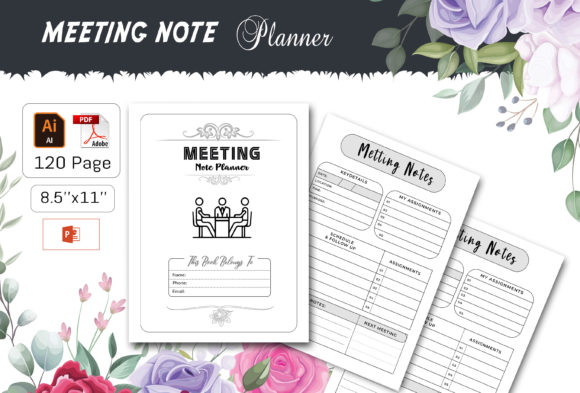
This tool is more than just a template; it is a system. As a fully editable vector file, the Meeting Note Planner offers the unique advantage of customization without sacrificing quality. You can adapt the layout to fit the specific rhythm of your team’s meetings, highlight different sections, or integrate your branding, all while maintaining a crisp, print-ready 300 dpi resolution. For professionals, marketers, and entrepreneurs, this transforms meeting documentation from an administrative chore into a strategic asset.
From Discussion to Action: Capturing Tangible Outcomes
A common post-meeting frustration is the ambiguity of what was decided. The Meeting Note Planner structures your documentation to emphasize outcomes. By having dedicated, clearly labeled sections for action items, deadlines, and responsible persons, it ensures that the energy of the discussion is channeled into executable steps. This structure strengthens communication by providing a single, authoritative reference document that all attendees can use, eliminating the "I thought you were doing that" scenarios that plague projects.
Consider a use case for a freelance creative working with a client. Using the planner to document a project kick-off meeting, the freelancer can clearly list client expectations, agreed milestones, and feedback points. The resulting PDF, ready to upload or print, becomes the shared project blueprint. This not only builds client confidence through professionalism but also saves the freelancer significant time later by preventing miscommunication and scope creep.
The Practical Advantage of Editable and Multi-Format Files
The true value of this planner lies in its flexibility. The included file formats—Illustrator AI/EPS, Microsoft PowerPoint PPT, JPEG, and a ready-to-upload PDF—mean it fits into virtually any workflow. An educator preparing a syllabus committee meeting can quickly tweak the template in PowerPoint, a tool they use daily. A small business owner can hand the AI file to a graphic designer to add company colors and logos, creating a branded suite of meeting documents.
The feature of 100 re-sizable vector shapes is particularly powerful for supporting creativity and improving presentation. These shapes can be used to create visual markers for priority levels, denote different types of agenda items, or simply make the notes more engaging and easier to navigate. This moves meeting notes from a textual record to a visual map of the discussion, aiding memory and comprehension for all involved.
Streamlining Publication and Personal Use with KDP Readiness
For a specific segment of the audience—bloggers, publishers, and content creators—the Meeting Note Planner offers a direct path to product creation. The package is formatted and tested for Kindle Direct Publishing (KDP), with US Letter size (8.5 x 11 inches) and a no-bleed setup. This means someone with insight into a niche market—like agile project managers, academic researchers, or community organizers—can use this editable foundation to build and publish their own specialized meeting notebook on KDP without the upfront cost of graphic design.
Similarly, for personal or in-office use, the print-ready file allows you to produce physical copies economically. Printing in your home, office, or local print shop gives teams a tangible, consistent tool for every meeting. The physical act of writing in a designated planner can simplify decision-making and problem-solving, as it encourages more deliberate thought and clearer recording compared to typing on a laptop during a fast-paced conversation.
Identifying Who Benefits Most and Considerations for Use
The Meeting Note Planner is particularly suited for individuals and teams whose work relies on recurring meetings with measurable outputs. Project managers, team leaders, consultants, and educators will find its structured approach aligns with goal-oriented work. It also supports hobbyists and community group leaders who need to formalize their planning without investing in complex software.
A possible limitation to consider is the need for basic familiarity with editing tools like Illustrator or PowerPoint to fully leverage the customization features. While the PDF and JPEG are immediately usable, the core value of adaptability requires some comfort with these platforms. For those solely seeking a static, printable notebook, the ready PDF is perfect. For those wanting to tailor every element, the vector files provide that depth, but it comes with a small learning curve if you are new to graphic software.
Integrating the Planner into Your Workflow
To get the most from this tool, start with the 120-page PDF. Use it for a few meetings to identify which sections are most critical for your needs. Then, if customization is desired, open the Illustrator or PowerPoint file and make those sections more prominent or adjust the layout. Perhaps you need a larger space for "Key Takeaways" or want to add a "Pre-Meeting Questions" box. The fully editable vector nature allows for these precise adjustments.
The inclusion of JPEG images also offers a simple middle path. You can insert these clean, high-quality page images into other documents or note-taking apps as a background template. This hybrid approach blends digital convenience with structured formatting.
Ultimately, the Meeting Note Planner serves as a foundational tool for transforming dialogue into direction. By providing a clear structure in a versatile, high-quality format, it helps bridge the gap between conversation and action, saving time, increasing efficiency, and providing a professional sheen to collaborative work. Whether you use it as-is, adapt it for your team, or build upon it to create your own KDP product, its value is rooted in elevating the simple act of taking notes into a practice of productive communication.