Introducing the 2023 - 2024 Monthly Planner Interior
For anyone looking to publish a professional planner or simply organize their own year with a custom tool, the digital interior template offers a powerful starting point. This specific 2023 - 2024 Monthly Planner Interior is a fully designed and formatted kit, engineered to bypass months of design work and technical hurdles. It’s not just a blank calendar; it’s a complete, tested foundation ready for your personal touch or immediate commercial use.
What This Planner Interior Package Provides
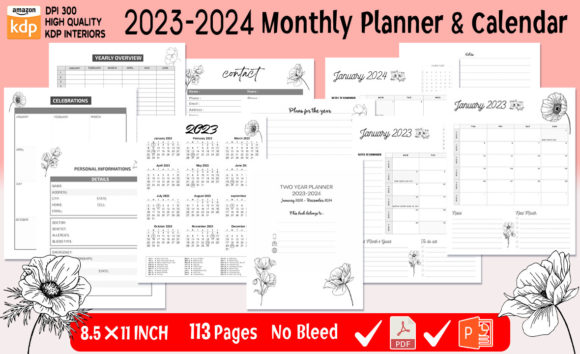
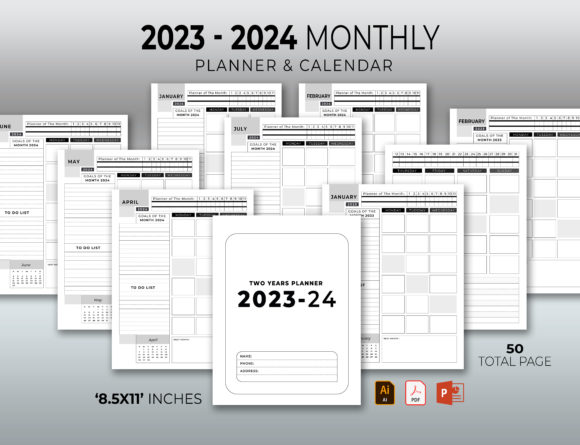
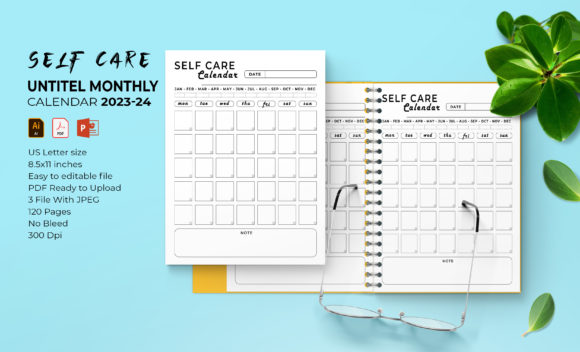
At its core, this is a production-ready digital product. The package includes 120 pages formatted for the US Letter standard size of 8.5 x 11 inches. Everything is built for clarity and ease, whether you intend to print a single copy for your home office or upload it to a platform like Amazon KDP for sale.
The true strength lies in its flexibility. You receive the source files in multiple, industry-standard formats. This means the design isn’t locked into a single, static PDF. The Illustrator AI/EPS files and Microsoft PowerPoint PPT file are fully editable. Every element, from the calendar grids to the decorative vector shapes, can be resized, recolored, or rearranged without losing quality. The inclusion of high-resolution 300 DPI JPEG images and a print-ready, no-bleed PDF covers every common need from digital sharing to physical printing.
Key Features and Practical Benefits
- Editable Foundation: Change fonts, colors, and layouts to match your brand or personal style perfectly. The 100 vector shapes are scalable assets you can use throughout the planner.
- Technical Reliability: Pre-formatted and tested for KDP upload, it eliminates common formatting errors that cause rejection, saving you time and frustration.
- Multi-Format Utility: With AI, PPT, PDF, and JPEGs, you can work in the software you’re comfortable with, whether for deep graphic editing or quick text adjustments.
- Professional Output: The 300 DPI quality ensures crisp, clear prints whether you use a home printer, local print shop, or professional KDP printing service.
Real-World Applications Across Different Fields
The utility of this 2023 - 2024 Monthly Planner Interior extends far beyond just creating a book to sell. Its adaptability makes it a versatile tool for numerous projects.
For entrepreneurs and small business owners, it can be branded and used as a premium client gift or an internal company planning tool. A marketing agency might customize it with their logo and color scheme, adding client milestone dates to create a thoughtful, useful branded item.
Educators and coaches can populate the templates with course schedules, assignment deadlines, or program milestones, creating a structured planner for their students or clients. The editable PowerPoint file makes this particularly straightforward for those less familiar with advanced design software.
Freelancers, writers, and bloggers can use the interior for personal productivity, tracking editorial calendars, content deadlines, and project phases. The clean monthly layout provides a visual overview that weekly planners often lack, ideal for managing long-term projects.
For the creative hobbyist, it’s a chance to design a unique planner without starting from scratch. You can insert personal artwork into the template, change the color palettes to suit your aesthetic, and print a one-of-a-kind planner for yourself or as a gift.
Commercial Use on Platforms Like Amazon KDP
In the world of self-publishing, particularly on Amazon’s Kindle Direct Publishing (KDP), time and technical compliance are critical. This 2023 - 2024 Monthly Planner Interior is built to meet KDP’s specifications. The ready-to-upload PDF with correct dimensions and no bleed means you can launch a product quickly. The editable files allow you to create multiple versions—perhaps a minimalist edition, a colorful vibrant edition, or a niche-themed planner for a specific audience—all from the same core asset, maximizing your potential product line with efficient work.
Evaluating and Implementing the Template
When considering a template like this, your evaluation should focus on your primary goal. Is it for a quick commercial upload? Then the pre-made PDF’s compliance is your main concern. Is it for deep customization? Then the availability of the Illustrator source files is paramount.
A practical recommendation is to start with the PowerPoint file if you’re new to design. It offers a familiar interface to swap out text and experiment with layouts. For more advanced adjustments like creating new graphical elements or altering the underlying structure, the Illustrator files are indispensable. Always test the final PDF through a personal printer or KDP’s previewer before finalizing, even with a “ready” template, to ensure everything aligns with your expectations.
The inclusion of JPEG images is a notable bonus. These can be extracted and used in digital marketing for the planner—social media posts, website banners, or advertising graphics—creating a cohesive visual campaign from the same design assets.
The Value of a Structured Starting Point
Ultimately, this 2023 - 2024 Monthly Planner Interior package provides more than pages; it provides a process shortcut. Design, formatting, and technical setup are often the most time-consuming parts of creating a planner. This interior removes those barriers, allowing you to invest your energy into what matters most: the content, the customization, and the strategic use of the tool itself. Whether your aim is enhanced personal organization, a branded professional tool, or a successful commercial product, having a reliable, adaptable, and professionally constructed foundation is the first and most crucial step.